Tiller Tools by Dave
One GitHub repo and Apps Script project for Tiller (https://tiller.com/) spreadsheets:
Tiller Amazon Import — sidebar wizard: upload Amazon’s orders data ZIP, and insert your Amazon orders, returns, digital orders, and digital returns in to Tiller.
Tiller Quick Search — sidebar to filter Transactions by date, amount, description, account, and category (basic filter + helper columns). See your search criteria for all key fields at all times, use date ranges, boolean operators in the description, and easily modify.
This software is produced by a Tiller user and is not affiliated with Tiller LLC.
Tiller Tools is a Google Sheets add-on that allows users to import and analyze Amazon order history within their personal Tiller spreadsheets.
All data is processed locally within the user's Google account. No data is transmitted to external servers.
Tiller Amazon Import Process
Request your orders.zip data file from Amazon https://www.amazon.com/hz/privacy-central/data-requests/preview.html
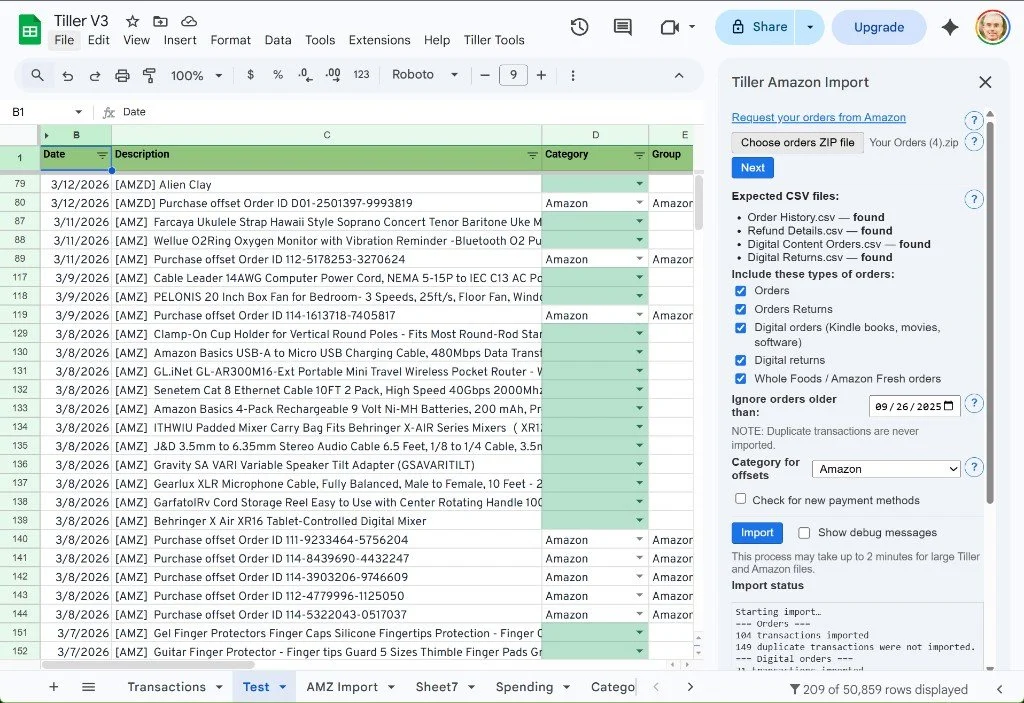
Click Tiller Tools / Tiller Amazon Import. The Amazon Import sidebar appears.
Select your zip file, and click Next
The contents of the zip file are examined - these types of transactions can be imported:
Orders (including Whole Foods groceries)
Digital Orders
Order returns
Digital returns
Uncheck any transaction types you don't want to import
Ignore orders older than a certain date - default is 6 months, which is usually fine. Duplicates are never created.
Set a category for offset transactions - normally Amazon or Transfer
If this is your first import, or if you have new credit cards in Amazon, Check for new payment methods
Click the Import button
Wait 30-50 seconds
New transactions appear on the Transactions tab, pre-filtered to show just those.
Tiller Quick Search Process
This is as simple as it sounds.
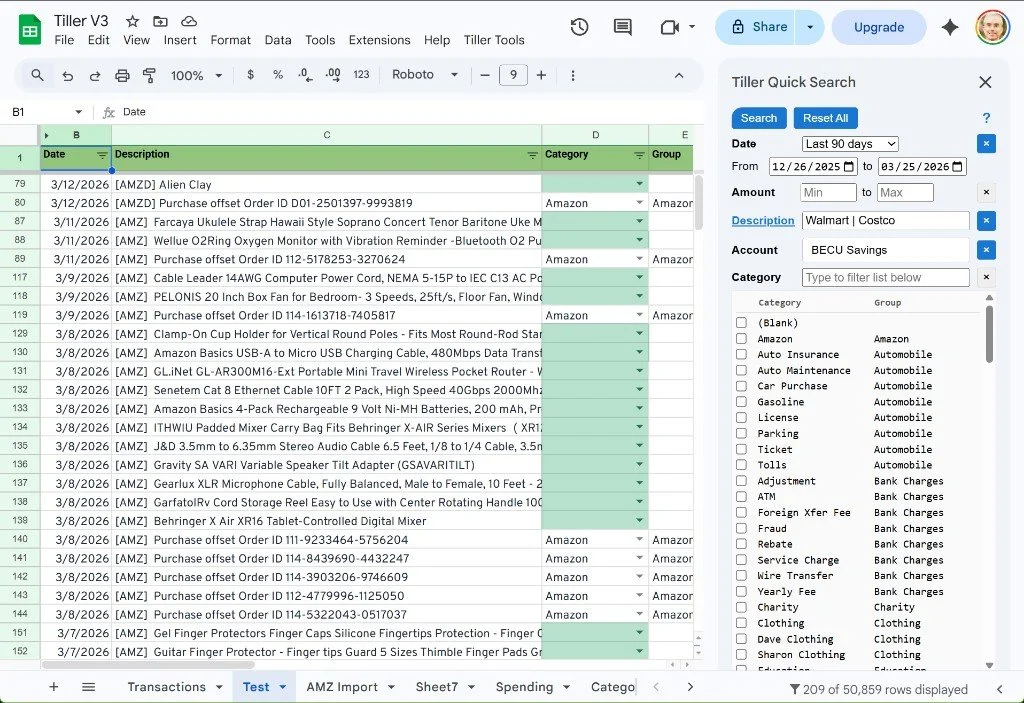
Click Tiller Tools / Tiller Amazon Import. The QuickSearch sidebar appears.
Enter in your criteria, and hit enter key or Search button at any time to see filtered results.
Click on the Description link in the sidebar to see examples of more complex searches such as Amazon | Walmart NOT Costco
Install
Search for Tiller Tools in the Google Marketplace to install the Addon.
Full details and all source code is here